
Identity Mesh
Where identities connect.
Unify, synchronize, and govern identities across every system in your environment with watermark-based delta sync and on-premises security.
Works with Your Existing Infrastructure
Bidirectional connectors for Active Directory, SQL Server, and File (CSV/TXT); Entra ID imports users and groups and writes back groups with their members and owners; Workday imports workers and writes back preferred name and work email; Okta is import-only today; LDAP, SCIM 2.0, and generic REST coming soon


Delta Sync
Process only what changed with watermark-based change detection (Active Directory's uSNChanged change counter, change-tracking columns for SQL Server).
Bi-directional Connectors
Seamlessly sync identities in both directions with conflict resolution and authoritative source management.
Policy-based Transforms
Define attribute mappings, transformations, and business rules with a safe transform engine and whitelisted functions.
Audit-ready Reporting
Complete audit trails with before/after values, run history per connector, and a UI-based audit viewer.
Identity Mesh Vault
Privileged checkout, owner-provided or blind rotation, scopes by group membership, and tamper-evident audit inside the same platform.
Self-Service Groups
Owner-managed AD and Entra ID groups with join policies, approvals, expiry, escalation, and a hash-chained audit trail. Onboard the groups you already have, in place, after a preview of every change.
MIM Migration Assessment
Analyze a Microsoft Identity Manager export, get a verdict with reasons, and cut over one management agent at a time.
Mesh Workflows
When an object enters or leaves a Composer group, add it to other groups, set attributes, send email, or call a signed webhook. Build it on a visual canvas with If/else branches.
AI Assistance
Suggested sync rules previewed on your own data, and plain-language explanations of failed runs and drift. Uses your own Claude or Azure OpenAI key, and is off until you turn it on.
Connector Editor & SDK
Set up any connector on one full page with Test connection built in. Build your own with the SDK you download from the console, and it can describe its own settings so the editor draws a proper form.
How It Works
Connect Sources
Connect Active Directory across every partition of a forest, SQL databases, files, Entra ID, Okta, and Workday with built-in connectors, or build your own on the Connector SDK.
Normalize & Transform
Apply attribute mappings, business rules, and governance policies to ensure consistent identity data across all systems.
Sync & Audit
Scheduled delta synchronization with complete audit logs and run history for every identity change.
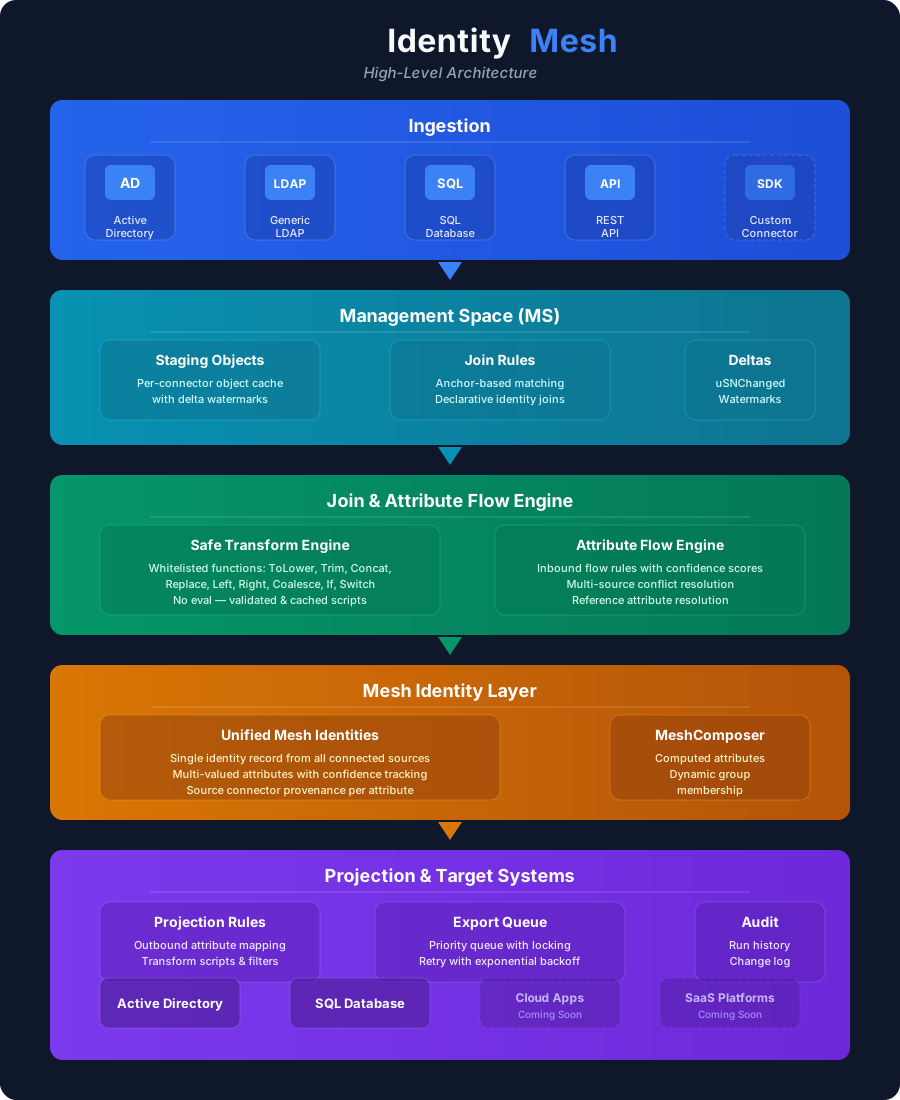
Architecture
Connectors & Agents for all major identity systems
Delta pipeline with real-time change detection
Transform engine with attribute mapping
Policy engine for governance and compliance
Audit log with full history and exports
Enterprise-grade Security
DPAPI-encrypted secrets, TLS for connections
Least privilege access with role-based permissions
On-premises deployment — your data stays in your network
Full audit trails for all identity changes
Comprehensive audit logging with before/after values
Role-based admin console with Windows or Entra ID sign-in
On-Premises Deployment
Identity Mesh runs entirely within your network — your identity data never leaves your infrastructure
Self-Hosted
Windows Service installed via MSI, backed by your own SQL Server database
- Complete data sovereignty
- Air-gapped deployment options
- DPAPI-encrypted secrets and Windows integrated sign-in
- Admin UI and REST API for configuration
Use Cases
Six of the situations teams run on Identity Mesh. See all nine use cases.
AD ↔ SQL Identity Sync
Synchronize user identities between Active Directory and SQL Server databases with attribute mapping, transforms, and confidence-based conflict resolution.
M&A Identity Consolidation
Consolidate identities across multiple directories during mergers and acquisitions using anchor-based join rules and projection.
HR → AD Provisioning
Flow employee data from HR databases into Active Directory with transform rules for username generation, group assignment, and attribute normalization.
Governance & Audit
Track every identity change with before/after values, run history per connector, and a comprehensive audit trail for compliance support.
Self-Service Group Requests
Take access requests off the service desk queue. Owners approve, high-impact groups get a second decision, and expiry empties groups nobody renews.
Privileged Account Vaulting
Vault service and admin accounts with approved checkout, one-time reveal, and scheduled rotation, without buying a second PAM product.
"Trusted by IAM and security teams"
Leading enterprises rely on Identity Mesh to unify and govern their identity infrastructure across complex, hybrid environments.
FAQ
What systems does Identity Mesh support?
Is synchronization real-time or scheduled?
How do attribute transforms work?
How does Identity Mesh handle conflicts?
What audit and reporting capabilities are included?
Ready to unify your identity fabric?
See how Identity Mesh can transform your identity synchronization and governance.