
Enterprise-Grade Identity Synchronization
Powerful features designed to unify, synchronize, and govern identities across every system in your enterprise environment.
Delta Sync
Process only what changed with watermark-based change detection — uSNChanged for Active Directory, configurable delta columns for SQL Server, and SHA-256 file hash for CSV/TXT files.
Key Benefits
- Watermark-based change detection
- Minimal network overhead
- Confidence-based attribute resolution
- Full and delta import modes
Common Use Cases
- Employee onboarding/offboarding
- Real-time access provisioning
- Organizational structure changes
Bi-directional Connectors
Seamlessly sync identities in both directions with conflict resolution and authoritative source management.
Key Benefits
- Active Directory, SQL Server, and File (CSV/TXT) connectors
- Extensible via the Connector SDK
- Import and export in both directions
- Configurable via Admin UI
Common Use Cases
- AD ↔ SQL identity synchronization
- HR database to AD provisioning
- M&A identity consolidation
Policy-based Transforms
Define attribute mappings, transformations, and business rules with a safe transform engine — no eval, no arbitrary code execution.
Key Benefits
- Safe transform engine (no eval)
- Whitelisted functions (ToLower, Trim, Replace, Concat...)
- Confidence scoring per attribute
- Four rule types: Join, Flow, Projection, MeshComposer
Common Use Cases
- Data normalization across systems
- Attribute enrichment
- Compliance-driven filtering
Audit-ready Reporting
Complete audit trails with before/after values, run history per connector, and a UI-based audit viewer for all identity changes.
Key Benefits
- Complete audit trail with before/after values
- Run history per connector
- UI-based audit viewer
- REST API access to audit data
Common Use Cases
- Compliance support and audit evidence
- Identity change investigation
- Sync operation troubleshooting
Tamper-Evident Audit
Every audit row is hash-chained with SHA-256 — a single broken link signals post-hoc tampering. Chain integrity verification surfaces the exact row a rogue admin would have to forge to hide their tracks.
Key Benefits
- Append-only SHA-256 hash chain over admin + object audit
- Verify through the Admin API or a command on the sync engine host
- Documented canonical form for external verifiers
- Survives DR restore — re-verify the chain after recovery
Privacy & Right-to-Erasure
Data Subject Access Requests and right-to-erasure are handled by dedicated Admin API endpoints. Erasure events ship through the chained audit trail so the act-of-erasure is itself non-repudiable evidence — exactly what GDPR Article 17 and SOC 2 Privacy auditors ask for.
Key Benefits
- Anchor-keyed DSAR returns mesh objects + attributes + audit history
- Repeat-safe (idempotent) erasure with a hash-chained ErasureRequest audit marker
- Per-attribute sensitivity classification (Public / Internal / Confidential / Restricted)
- Privacy / DPO role separates from day-to-day operator entitlements
Multi-Vault Secret Storage
Connector credentials never live on disk in plaintext. Choose the secret store that fits your environment — DPAPI on the host, Azure Key Vault for Azure-native deployments, HashiCorp Vault for non-Azure shops — chosen on the Settings → Secrets page of the Admin Portal.
Key Benefits
- DPAPI default for on-prem, no extra infrastructure
- Azure Key Vault with managed identity or an app registration
- HashiCorp Vault KV v2 with Token or AppRole auth
- Vault-portable secrets unlock active/passive HA
SIEM Integration Suite
Five forwarding paths cover every common SIEM. Splunk, QRadar, ArcSight, Sentinel, Graylog — pick the transport your collector already speaks instead of building a custom pipeline.
Forwarding Paths
- RFC 5424 Syslog (TCP / TLS / UDP) for Splunk, QRadar, RSyslog, Graylog
- HTTPS Webhook (batched, CompactJson; HMAC-SHA256 signing on the roadmap) for SOAR / custom collectors
- Microsoft Sentinel direct ingestion via Log Analytics workspace
- CEF v0 + LEEF v2.0 formatters for ArcSight + QRadar legacy parsers
- Rolling file + Windows Event Log out-of-the-box
Compliance-Ready
Documented STRIDE threat model, SOC 2 Trust Service Criteria mapping, ISO 27001:2022 Annex A gap analysis, and an incident-response runbook structured around NIST SP 800-61 — answers the auditor questions before they ask.
Key Benefits
- SOC 2 + ISO 27001 + GDPR control mappings shipped
- RFC 9116 security.txt + coordinated-disclosure policy
- CycloneDX SBOM auto-generated on every release
- Customer-side SQL TDE + connection-encryption runbook
Hybrid Authentication
Run the Admin portal under Windows Integrated Authentication for domain-joined deployments, Entra ID MSAL for cloud-native, or both at once — each request is routed by the credential type the browser presents.
Key Benefits
- Windows Integrated Authentication (Negotiate / Kerberos) by default
- Entra ID sign-in (single + multi-tenant)
- JWT bearer scheme + role-claim mapping on the API
- API key or Entra service-principal authentication for relay agents
IdentityMesh Vault
Privileged checkout, rotation, and tamper-evident audit built into the platform you already deploy for synchronization. Stop buying PAM as a second product.
Key Benefits
- Included in the Enterprise plan, no add-on module fees
- Owner-provided or blind rotation for AD, SQL, and Entra ID accounts
- Audit events join the append-only audit hash chain
- Existing Viewer / Operator / Admin roles get scoped Vault permissions
Common Use Cases
- Replacing a CyberArk or Delinea renewal
- MIM migrations that also need vaulting
- Service-account checkout with tamper-evident audit
Self-Service Groups
Owner-managed Active Directory and Entra ID groups. Users create groups within policy, others request to join, owners approve, and the mesh provisions the result through the connectors you already run.
Key Benefits
- Open, owner-approval, and closed join policies
- High-impact groups require a second administrator decision
- Expiry warnings, restore window, and purge on a schedule
- Owner escalation to the manager when the last owner leaves
- In-portal inbox and email notifications
- Onboard existing AD groups in place, after a preview of every member the first export would remove
Common Use Cases
- Replacing MIM group self-service
- Taking access requests off the service desk
- Hybrid AD and Entra ID group governance
MIM Migration Assessment
Analyze a Microsoft Identity Manager export before you commit. The analyzer gives a verdict with reasons, proposes connectors and flows with evidence, and saves the plan as a migration project in the Admin Portal.
Key Benefits
- Structurally anchored flow and connector counts
- Proposed connectors, join rules, and projection rules per management agent
- A ranked census of the expression features scripted flows need
- Side-by-side cutover with staging mode
Common Use Cases
- Retiring MIM or FIM
- Scoping a migration engagement before it is sold
- Consolidating SQL and multi-partition AD agents
Mesh Workflows
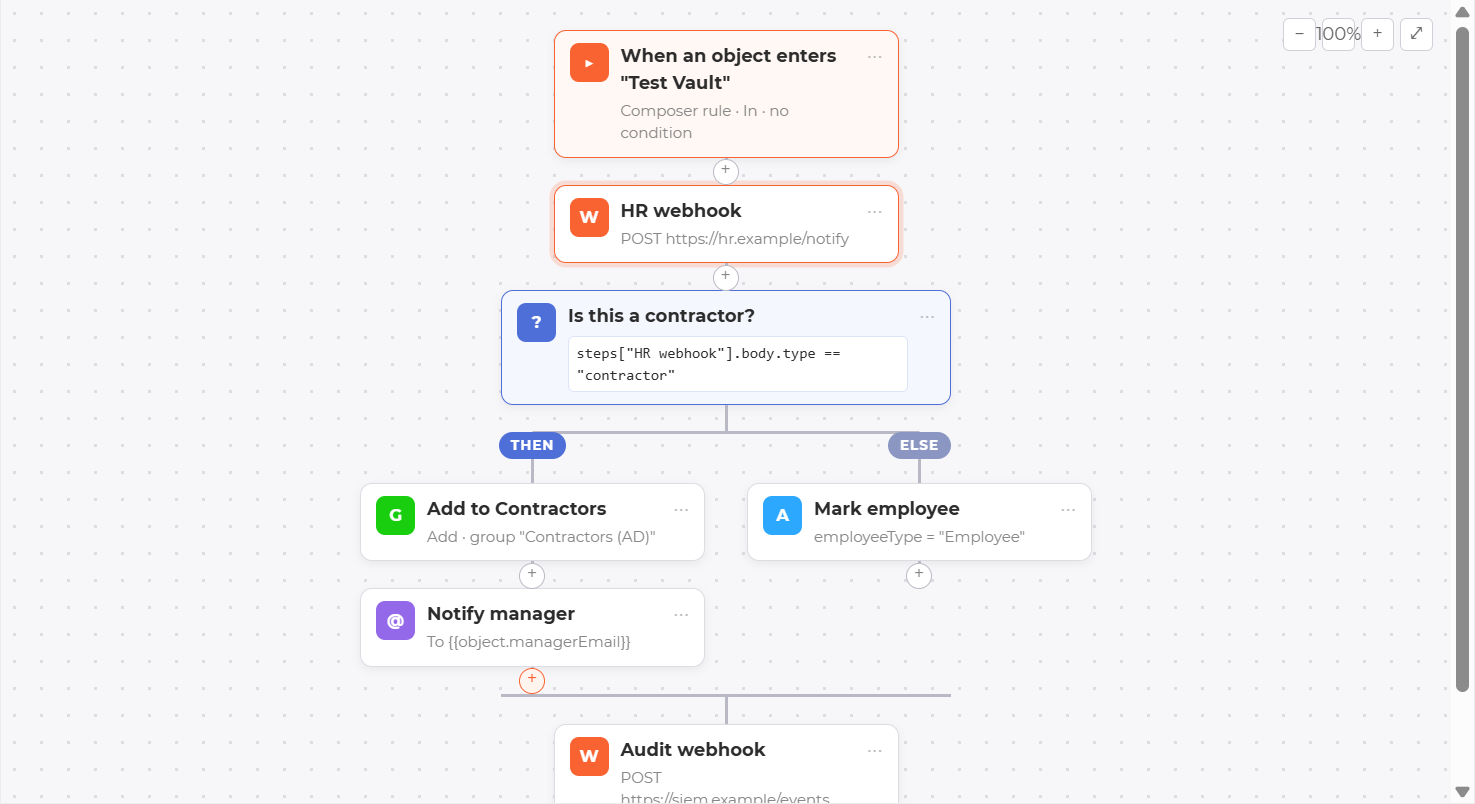
EnterpriseAct the moment an object enters or leaves a Composer group, a group whose members are set by a rule. A workflow can add it to another group, set attributes, send an email, or tell another system with a signed webhook. You build it in a visual designer.
Key Benefits
- Four steps: group, set attributes, email, signed webhook
- If/else branches, and steps that use earlier steps' results
- Automatic retry and a full run history
- Guards against loops and sudden bursts of runs
AI Assistance
EnterpriseOptional help in the console. Get suggested sync rules for a connector, and a plain-language explanation when a run fails or a connector drifts. It uses your own AI account and never acts on its own.
Key Benefits
- Suggested rules previewed on your own imported rows
- Explanations that show the log lines they rest on
- Bring your own Claude or Azure OpenAI key
- Off by default; passwords and secrets are never sent
Connector Editor & Custom Connectors
Set up every connector on one full page: a list of sections on the left, a check mark on each finished section, and Test connection in the footer. Build your own connector on the same SDK the bundled connectors use. Download it from the console, and your connector can describe its own settings so the editor draws a proper form for them.
Key Benefits
- Same contract as the bundled AD, SQL, Entra ID, Okta, Workday, and File connectors
- Test connection runs on the server or relay agent that runs the connector
- Custom connectors appear in the editor on their own once loaded
- Relay agents load only connectors signed by a publisher you allow
Common Use Cases
- Badge, lab LDAP, and mainframe sources
- In-house applications with their own user tables
- Systems no vendor ships a connector for
Connector Object Controls
Step in on a single account without touching the rest. Isolate freezes one account while you investigate. Disconnect unlinks an account from the wrong person, or from someone who has left.
Key Benefits
- Isolate: nothing flows in or out until someone releases it
- Disconnect: unlink an account, and hold its exports until someone releases the hold
- Available from the person's page and from the connector's object list
- "Connected to" badges on My Groups show which systems each group reaches
Organization Branding
Make the console look like yours. Set the product name, logo and colours once, and everyone in your organization sees them. With nothing saved, the console looks exactly as shipped.
Key Benefits
- Product name, logo, sidebar and accent colours, header style
- Rename navigation entries and choose their icons
- Show each entry only to the roles that need it, without granting anything new
Reconciliation & Drift
Know that every sync was complete. Identity Mesh compares what it holds with what the last full import saw, and with a fresh count taken from the source system itself.
Key Benefits
- Drift measured against the last successful full import
- Count source on demand to catch records the sync never saw
- Object counts show live records, with deleted ones counted apart
- Evidence for SOC 2 and ISO 27001 processing-integrity controls
Event Log
One Windows event log for the whole product. When something looks wrong, open Event Viewer and see every warning and error in one place, labelled with the component that raised it.
Key Benefits
- One source per component: API, sync engine, relay agent, web console and more
- Connector run errors and errors in users' browsers land there too
- Only warnings and errors, so the log stays short and readable
- Forward it to your SIEM like any other Windows log
Also in the platform
More capabilities, each with its own guide.
Projection templates
Save a connector's export rules as a template and apply it to another connector.
Sync rule templates
Ready-made join and flow rules for each connector, including hybrid Entra ID.
Secret providers
Keep secrets in Windows protected storage or Azure Key Vault, and move between them.
Vault RDP Connect
Open a remote desktop session with a checked-out account without seeing its password.
Group onboarding
Bring existing directory groups under self-service management, after a preview of every change.
Mesh object detail
One page per identity: attributes, linked accounts, workflow runs and history.
SIEM forwarding
Send audit events to syslog, webhooks, Microsoft Sentinel, or CEF and LEEF collectors.
Audit chain
Check that no audit row has been changed or removed, through the Admin API or a command on the sync engine host.
Works with Your Existing Infrastructure
Bidirectional connectors for Active Directory, SQL, and File (CSV/TXT); Entra ID imports users and groups and writes back groups with their members and owners; Workday imports workers and writes back preferred name and work email; Okta is import-only today; LDAP, SCIM 2.0, and generic REST coming soon


Ready to modernize your identity infrastructure?
See how Identity Mesh can transform your identity synchronization and governance.