
Architecture
A five-stage sync pipeline running in one Sync Engine, one Admin API, and one SQL database, with relay agents reaching into networks you cannot open. Vault and self-service groups run against the same mesh, through the same connectors, into the same audit chain.
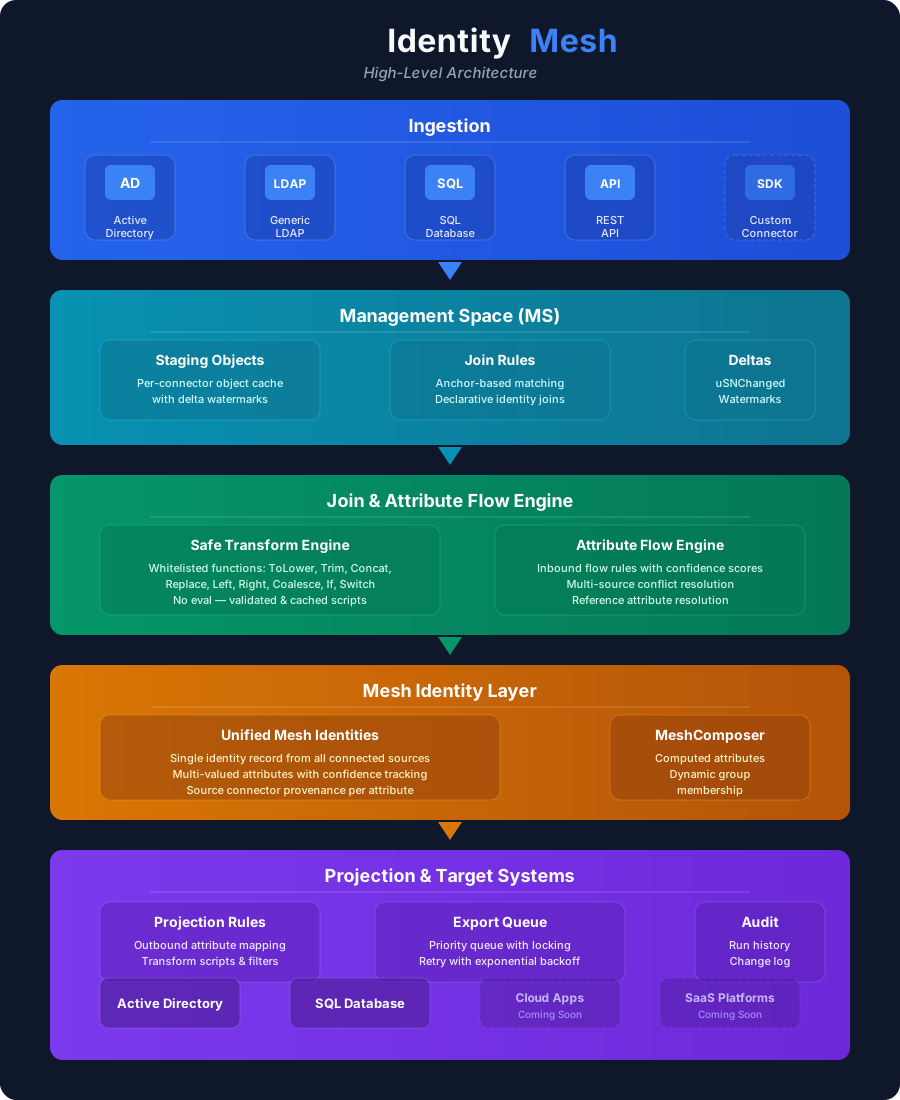
Sync Pipeline
Every identity change flows through five deterministic stages, each with its own rules and audit trail.
Import
Connectors read objects from source systems and stage them into the Management Space, the per-connector staging area in the database. Active Directory is read across every partition of a forest, SQL Server through queries, Entra ID through Microsoft Graph delta queries, Okta and Workday through their APIs, and files with automatic delimiter and header detection. Each batch is written in one transaction with a watermark checkpoint, so a crash mid-import re-syncs from the last checkpoint rather than from zero.
Join
Join rules correlate imported connector objects to existing mesh identities. Each rule maps a connector-side attribute to a mesh-side attribute, and the engine reads the value directly from the raw connector object, so no inbound flow rule is needed for a join to work. Rules are evaluated in priority order until one matches. If none match and the anchor rule permits creation, a new mesh object is projected.
Attribute Flow
Inbound flow rules map connector attributes to mesh attributes with an optional transform and a confidence score. When several sources provide the same attribute, the highest-confidence value wins. Reference attributes such as manager, managedBy, and member become relationship edges in the mesh, which is what lets ownership and membership flow back out to any target.
Projection
Projection rules define how a mesh object is represented in each target. Attribute rules map mesh attributes to target attributes with outbound transforms, and a precondition decides whether the object belongs in that target at all. Projection templates save a rule set and apply it to another connector. Export preview reports what the engine would actually do, including whether the object already exists.
Export
The export queue processes pending changes in priority order. Each item is locked, exported, confirmed, and linked to its Management Space row. Failed exports retry with backoff. A delete is emitted only when a precondition stops holding for an object that exists, never on a missing link alone. Staging mode lets a new connector run and export nothing until you confirm it. Relay-assigned connectors export through their agent, and a shared connector is re-initialized per item so one batch can never write under another connector's credentials.
Components
Six moving parts. Everything durable lives in SQL; everything ephemeral lives in the process that owns it.
Sync Engine
Windows service that runs the five-stage pipeline on connector schedules.
- Import, Join, Flow, Projection, Export pipeline
- Export drain once a minute, decoupled from imports
- Pause and resume with mid-sync cancellation
- Heartbeat monitoring and orphan run detection
- MeshComposer for criteria-based group membership
Admin API and Portal
REST API with a real-time SignalR hub, and the web portal that sits on top of it.
- REST endpoints for connectors, rules, schedules, mesh, audit, Vault, groups, and migration
- Role-based access with permissions scoped per feature area
- Operations posture, reconciliation, and orphan cleanup
- Export preview and queue management
- In-portal inbox with email delivery
Connector Layer
Connectors built on the packaged SDK, loaded from a folder by the engine or a relay agent.
- Active Directory (LDAP/LDAPS, multi-partition), SQL Server, and File are bidirectional
- Entra ID imports users and groups and writes back groups, members, and owners
- Workday imports and writes back preferred name and work email; Okta is import-only
- Test connection, browse, and discovery from the portal
- Connector SDK with retry, change ordering, composite keys, and export routing
Relay Agent
Lightweight Windows service in a remote network that runs connectors on behalf of the engine.
- Outbound-only HTTPS to the Admin API, no inbound firewall rules
- Loads the same connector DLLs as the engine
- Runs imports and exports for its assigned connectors
- Large imports stream in chunks so no component holds the whole result
- Registered, monitored, and re-keyed from the portal
Vault
Privileged checkout and rotation, running inside the Admin API against the same mesh.
- Password setters per target: AD over LDAPS, SQL logins, Entra ID over Graph
- Scopes grant access by mesh group membership
- Three sweeps: session expiry, scheduled rotation with backoff, missing source
- Credentials revealed strictly once through a one-time URL
- Events join the append-only audit hash chain
Self-Service Groups
Owner-managed groups modelled as ordinary mesh Group objects with their own policy and request tables.
- No second provisioning path: the export engine does the work
- Marker attributes drive the AD and Entra projection preconditions
- Three sweeps: expiry, orphaned owner, provisioning status
- Owners and members flow as relationship edges
- Hash-chained group audit with its own retention
Key Capabilities
Built-in behaviour that makes the pipeline safe to run against production directories.
Tamper-evident audit chain
Admin, object, Vault, and group audit tables are append-only and hash-chained. Verification runs from the portal. Events stream to a SIEM over syslog, CEF, LEEF, webhook, or Sentinel.
Confidence-based attributes
When several sources provide the same attribute, the highest-confidence value wins. HR can be authoritative for job title while Active Directory is authoritative for login name.
Safe transform engine
Sandboxed expression engine with no arbitrary code execution and whitelisted functions such as ToLower, Trim, Replace, Concat, Coalesce, If, and Switch. Scripts are validated before storage and cached.
MeshComposer
Criteria-based group membership with nested AND/OR groups. Composer-managed and self-service memberships are tracked separately, so the two never disturb each other.
Secret stores with host binding
DPAPI on the host, Azure Key Vault, or HashiCorp Vault behind one abstraction. A DPAPI secret records the host that minted it, and a connector refuses to run elsewhere with a message naming that host instead of silently falling back to integrated authentication.
Migration assessment
The analyzer reads a Microsoft Identity Manager export, gives a verdict with reasons, and proposes connectors, flows, and join rules. The portal saves the analysis as a project and applies decisions with real failure reasons.
Reconciliation and cleanup
Uniqueness re-resolution, duplicate and mesh-level orphan cleanup with preview and a snapshot gate, audit-backlog purge, and an operations posture view that reports drift between the mesh and its targets.
Export preview
Preview per connector what the engine would write, delete, or leave alone before it runs. The preview uses the same logic as the export, so it answers with what the engine would actually do.
Workload distribution
Connectors can be assigned to named engine instances that heartbeat independently. This distributes work; it is not active-active high availability, and the deployment model below says exactly what is and is not supported.
Deployment Model
One Admin API, one Sync Engine, one SQL database, and zero or more relay agents. Self-hosted, installed from one MSI, with SQL Server providing the high-availability story.
Sync Engine
Windows service installed by the MSI. Shares a host with the Admin API or runs on its own; the product does not care.
- Named instances for workload distribution
- Connectors loaded from the local DLL folder
- Talks only to SQL, never to the Admin API
Admin API and Portal
Windows service hosting Kestrel behind HTTPS, with the Angular portal served on IIS. Configurable URLs and certificates from the installer.
- Windows Negotiate or Entra ID sign-in
- Hosts the relay hub and the Vault, group, and migration sweeps
- Swagger UI for API exploration
Relay Agents
One per remote host: branch office, partner data center, or a network segment with no inbound access.
- Outbound HTTPS only, API-key authenticated
- Receives already-resolved credentials, never decrypts secrets
- Independent of each other and of the engine
What survives a failure
Admin API restarts
The Windows service restart policy brings it back. The Sync Engine is unaffected because both talk to SQL, not to each other. Relay agents reconnect when the hub returns.
Sync Engine restarts
Any in-flight batch rolls back as one transaction. The watermark stays at the last checkpoint, so the connector re-syncs from there on the next tick.
SQL Server unavailable
Everything pauses. Connection retries ride out short blips, and longer outages show on the readiness endpoint until the database returns.
Relay agent offline
Its queued work replays from SQL when it reconnects. The engine does not block on an offline relay.
What is not supported today
- Active-active scale-out. Engine instances distribute work; they do not coordinate as a cluster.
- Zero-downtime rolling upgrades. Plan a maintenance window.
- Permanent loss of the API or engine host. Install the MSI on a replacement pointing at the same database and re-provision DPAPI secrets, which do not travel between hosts. The backup and restore runbook covers it.
Technical Specifications
Technology stack
Security
Integration protocols
Data model
Ready to See It in Action?
Let us walk you through the architecture and show how Identity Mesh fits your environment.